Wednesday, 27 February 2013

Find out if the user is an administrator

Today I wanted to find out if the logged in user in Dynamics AX 2012 is an administrator so I did a bit of search and found out the solution.

SecurityRights secRights = SecurityRights::construct();

if(secRights.isSystemAdministrator())
{
    info('User is an admin');
}

This posting is provided "AS IS" with no warranties. Use code at your own risk.

Saturday, 23 February 2013

Dimension framework in AX2012

Bill Frandsen from Microsoft Dynamics AX GFM team has published a series of posts on Dimensions in AX2012. It consist of 7 posts. I would strongly recommending going through these posts. The posts cover different areas of Dimension framework with showing how to set-up things in AX and then showing how it is saved in the database.

Ledger account combinations - Part 1 (Dimensions)
Ledger account combinations - Part 2 (Dimension enumerations, default dimensions)
Ledger account combinations - Part 3 (Structures and constraints)
Ledger account combinations - Part 4 (Advanced rules)
Ledger account combinations - Part 5 (Ledger dimensions (A))
Ledger account combinations - Part 6 (Ledger dimensions (B))
Ledger account combinations - Part 7 (Advanced topics)

This posting is provided "AS IS" with no warranties. Use code at your own risk.

Saturday, 16 February 2013

Navigation pane missing after adopting Ax2012 Feature pack

When we upgraded last year to AX2012, we decided not to implement feature pack. Later Microsoft recommended to adopt the feature pack (Microsoft Dynamics AX 2012 Feature Pack Release and The Microsoft Dynamics AX 2012 Feature Pack—Why You Should Adopt it Moving Forward.)

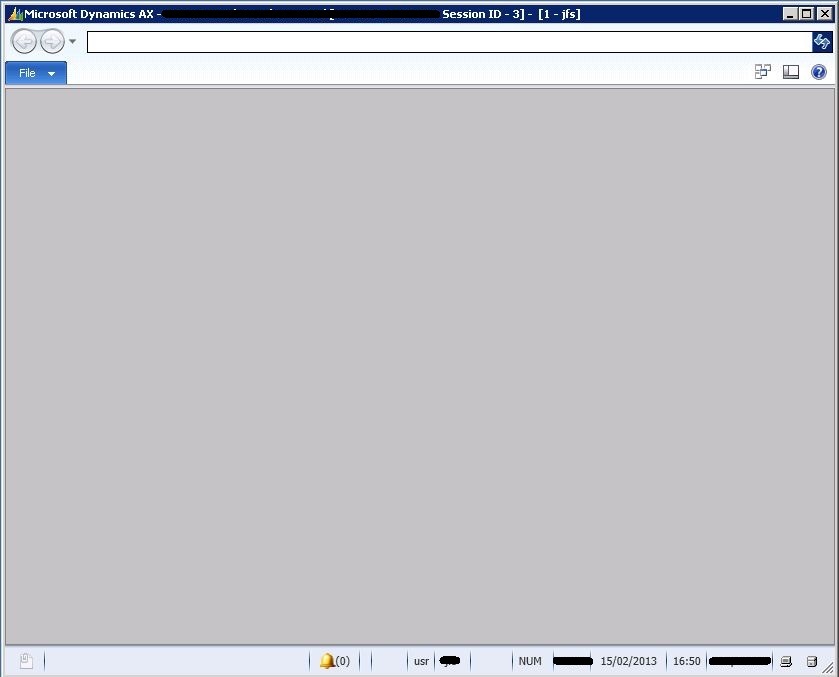
So finally we started work on it and everything was smooth until we restarted the AX2012 client. We were presented with the following screen


As you can see that there is no navigation pane and nothing else on the screen. Opening another workspace by pressing Ctrl+w would bring back the normal client screen. We reported the issue to Microsoft and it appeared a record was missing from RetailSetupLog. The problem will only surface when Retail configuration key is turned on. To fix the problem a record should be created (from within AX) with the following details

Description = Finished
RetailBuild = 6.1.1108.0
Name = SysCheckList_Upgrade

This posting is provided "AS IS" with no warranties. Use code at your own risk.

Saturday, 1 September 2012

Printing and SalesFormLetter.update

We had a small modification done where the users are able to bulk post the sales orders. The modification used the following code to post the sales orders

salesFormLetter = SalesFormLetter::construct(DocumentStatus::Invoice);
salesFormLetter.getLast();

printJobSettings = new PrintJobSettings(salesFormLetter.printerSettingsFormletter());
salesFormLetter.update(salesTable, SystemDateGet(), SalesUpdate::PickingList, AccountOrder::None, false, true);


Above code uses the last user printer settings and sends the print there. We recently discovered that in some cases the invoices were being printed but the order remained un-invoiced in the system. The problem started happening or being reported after we upgraded to AX2012. Apparently while the order is being invoiced, system sends the print and then something happens that causes the roll-back, but at this point the print is already out of the printer. The users were handing over the invoice to the customers without realizing that the order is not invoiced. Now the order can be invoiced again but it will produce another invoice number which is a problem as customer copy and the system won't match. We decided to print the invoice after the order is invoiced. Not sure whether there is a problem with salesFormLetter.update method or we were using it in a wrong way.

This posting is provided "AS IS" with no warranties. Use code at your own risk.

Friday, 13 July 2012

OData error and office add-in

Recently I was trying to use OData for one of our user requirements. I was following the post from Robin. Every thing was smooth until the moment I tried the URL to return the OData Query Service definition

http://aoshost:8101/DynamicsAx/Services/ODataQueryService/


Following error appeared
The server encountered an error processing the request. The exception message is 'Exception of type 'Microsoft.Dynamics.AX.Framework.Services.Metadata.Exceptions.MetadataItemException`1[Microsoft.Dynamics.AX.Framework.Services.Metadata.Contracts.FieldGroupMetadata]' was thrown.'. See server logs for more details. The exception stack trace is:
at Microsoft.Dynamics.AX.Framework.Services.ODataQueryService.ODataMetadataCache.get_Metadata() at Microsoft.Dynamics.AX.Framework.Services.ODataQueryService.ODataService`1.GetService(Type serviceType) at System.Data.Services.WebUtil.GetService[T](Object target) at System.Data.Services.DataService`1.CreateProvider() at System.Data.Services.DataService`1.HandleRequest() at System.Data.Services.DataService`1.ProcessRequestForMessage(Stream messageBody) at SyncInvokeProcessRequestForMessage(Object , Object[] , Object[] ) at System.ServiceModel.Dispatcher.SyncMethodInvoker.Invoke(Object instance, Object[] inputs, Object[]& outputs) at System.ServiceModel.Dispatcher.DispatchOperationRuntime.InvokeBegin(MessageRpc& rpc) at System.ServiceModel.Dispatcher.ImmutableDispatchRuntime.ProcessMessage5(MessageRpc& rpc) at System.ServiceModel.Dispatcher.ImmutableDispatchRuntime.ProcessMessage31(MessageRpc& rpc) at System.ServiceModel.Dispatcher.MessageRpc.Process(Boolean isOperationContextSet)
As the error states there is an issue with the field group metadata, but this does not explain what the error is, which table in the query has this error or how to resolve it. One of the tables in the query was CustTable and we have some modifications on this table. I then tried to read data from this table in Excel using office add-in and it threw the following error


Excel add-in was right on the spot in finding out the error that a field present in the field group does not actually exist in the table fields and the reference in field group was invalid (it was a custom field that during the upgrade was removed from the table but the was still present in the field group). Once that field was removed from the field group OData service was fine. Now what I really wonder is why one part of the application gives you meaningful error and not the other?


This posting is provided "AS IS" with no warranties. Use code at your own risk.