Showing posts with label Dynamics AX. Show all posts

Tuesday, 5 June 2018

Import label files X++

Following job can be used to import multiple label files from a folder. The label files are not automatically saved in AOT so a manual Save all is required.

static void LabelFileImport(Args _args)
{
    #File
    
    FilePath                        directoryPath, filePath;
    Filename                        fileName, fileNameWithPath;
    SysLabelFile                    labelFile;
    Set                             languages;    
    
    System.String[]                 files;
    System.Collections.IEnumerator  enumerator;
    
    directoryPath = @"D:\TempNav\LabelFiles"; // folder to import from
    info(strFmt("Import path: %1", directoryPath));
    
    try
    {
        files = System.IO.Directory::GetFiles(directoryPath, '*.ald');
        enumerator = files.GetEnumerator();
    }
    catch
    {
        info(strFmt("Failed to get file list from path %1", directoryPath));
    }
    
    if (enumerator)
    {
        while (enumerator.MoveNext())
        {
            fileNameWithPath = enumerator.get_Current();
            
            try
            {
                [filePath, fileName] = fileNameSplit(fileNameWithPath);
                
                labelFile = SysLabelFile::newFilename(fileNameWithPath);
                languages = new Set(Types::String);
                languages.add(labelFile.parmLanguageId());
        
                SysLabelFile::createLabelFileInAOT(labelFile.parmModuleId(), languages);
                labelFile.importAldFile(fileNameWithPath);
        
                info(strFmt("@SYS322092", fileName));
            }
            catch
            {
                info(strFmt("Filed to import file %1", fileName));
            }
        }
    }
}

This posting is provided "AS IS" with no warranties. Use code at your own risk.

Tuesday, 22 May 2018

Export label files X++

Following job can be used to export multiple label files of a particular language to a folder. There is an option to save the files as a different language file as well (in case the files are to be used for translation or to be imported as different language)

static void LabelFileExport(Args _args)
{
    #File

    SysLabelFile    sysLabelFile;
    str             labelModule, labelFileName, labelLanguage;
    str             labelSaveAsLanguage, labelSaveAsFileName;
    container       labelModuleCon;
    int             i;
    FilePath        path;
    FileName        fileName;

    path                = @"D:\TempNav\LabelFiles"; // folder to export to
    labelModuleCon      = str2con("ASC,ASG"); // labels to export
    labelLanguage       = "en-us";
    labelSaveAsLanguage = "en-za"; // set as "" to export with original language name

    if (!strEndsWith(path, #FilePathDelimiter))
    {
        path += #FilePathDelimiter;
    }
    info(strFmt("Export path: %1", path));

    for (i = 1; i <= conLen(labelModuleCon); i++)
    {
        labelModule = conPeek(labelModuleCon, i);

        try
        {
            labelFileName = strFmt("Ax%1%2.ald", labelModule, labelLanguage);

            if (labelSaveAsLanguage != "")
            {
                labelSaveAsFileName = strFmt("Ax%1%2.ald", labelModule, labelSaveAsLanguage);
                fileName = path + labelSaveAsFileName;
            }
            else
            {
                fileName = path + labelFileName;
            }

            sysLabelFile = SysLabelFile::newFilename(labelFileName);
            sysLabelFile.toFile(fileName);

            if (labelSaveAsLanguage != "")
            {
                info(strFmt("Successfully exported label file %1 as %2", labelFileName, labelSaveAsFileName));
            }
            else
            {
                info(strFmt("Successfully exported label file %1", labelFileName));
            }
        }
        catch
        {
            info(strFmt("Failed to export label file %1", labelFileName));
        }
    }
}

This posting is provided "AS IS" with no warranties. Use code at your own risk.

Sunday, 21 February 2016

A call to SSPI failed, AX-BizTalk WCF service

Recently we developed integration between AX and an external system through BizTalk. The data flow from BizTalk to AX was using a WCF service. Everything worked fine in dev/test/uat systems. Once the code was deployed to production system and configured to talk to BizTalk we started getting the following error.

A call to SSPI failed, see inner exception. ---> System.ComponentModel.Win32Exception: The target principal name is incorrect

On investigation we found that User Principal Name (UPN) was not setup properly on the BizTalk Send port. The UPN is usually the AD user under which AX service is running (in an email format e.g. axServiceUser@companydomain.com). It can also be viewed from the service WSDL URI. Find the service from the inbound ports and copy the WSDL URI.


Paste the URI in internet explorer and WSDL will be shown. Scroll to the end and UPN is shown (highlighted below).


Copy this value and paste it in the "Endpoint Identity" in the Send port of BizTalk application as shown below


The error message should disappear.

Note: There may be other causes (Kerberos/Double hop issues) of this error message. In our cause this was the only issue.

This posting is provided "AS IS" with no warranties. Use code at your own risk.

Wednesday, 30 December 2015

AX7 Technical Changes Summary

With the AX 7, Microsoft Dynamics AX have been changed in such a manner that it can truly be classed as a brand new platform. On the function side, the changes are minimal (only the required changes to run the features on this  new platform).

In today's post, we'll look briefly at what is changed from technical perspective.

Client
The win 32 rich client is replaced with a browser (IE, Edge, Chrome, Safari).

AOS
Replaced with the ASP.Net web application running on an IIS.

Batch
If the AOS is gone, how my batches will run? Well a new windows service will perform this task.

MorphX
This is replaced with Visual Studio. Extensions have been added to VS to deal with model management, code compile and build. The compilation can either be done from VS or using a standalone tool xppc.

XPP
XPP stays as it is  (on the surface). Under the hood there is no p-code, no interpreter. The compile now results in CIL. The unit of compile is the object itself. What does this means? Before AX7 if a method of a class fails to compile, other methods were still usable. IN AX7 the whole class's compilation will fail. There are a lot of other enhancements to XPP. MFP's blog is the best place to find out what these are.

AOT
AOT is visible from VS in a read-only mode and is called "Application Explorer". It is available in "Classic view" and "Model View". The object location have changed for some of the objects  (EDT, classes etc.) and these are now grouped with similar objects.

Model Store
Model store is no more in the database. The AX application code is stored in the files on disk in XML format.

Model
The concept of model is same as previous versions i.e. a group of objects that typically can be distributed.

Package
New concept in AX7. A package can consist of one or more models and is a used for deployment/compilation of these models. Each package have its own folder. Inside the package folder model folders exist.

VS Solution
A VS solution is a collection of projects. The solution information is not saved in the packages/models.

VS Project
A VS project is a group of objects that are related. A VS solution can have more than one VS project. Similar to VS solution, the project information is not saved in the packages/models. A VS project can only belong to one Model. Projects can be exported as .axpp file and imported on other AX7 installations.

Debugging
There is no standalone debugging application. VS is used for debugging. To start debugging a start-up project and start-up object must be specified.

Build
A single project, model or a set of models can be build. The option to synchronise database is available as part of the build process.


This posting is provided "AS IS" with no warranties. Use code at your own risk.

Tuesday, 13 January 2015

Bug in DynamicsPerf views

If you have used DynamicsPerf, you may have come across views to analyse Dynamics AX database for performance issues. Two of these views are
  • MISSING_INDEXES_CURR_VW 
  • QUERY_STATS_CURR_VW. 
As the name implies, these views gives insight into the missing indexes or query stat for the last run of the capture stat job (hence the word CURR in the name). There are similar views without the CURR word which shows data for all runs of capture stat job.

In the latest version (1.2) there is a bug in the views resulting in these showing all data instead of the last run of capture stat job. To fix the bug change the views and add the highlighted lines
           INNER JOIN STATS_COLLECTION_SUMMARY S2 WITH (NOLOCK)  
         ON QS2.STATS_TIME = S2.STATS_TIME  
          AND QS2.DATABASE_NAME = S2.DATABASE_NAME AND S2.RUN_NAME NOT LIKE 'BASE%'  
                      AND QS2.STATS_TIME = (SELECT MAX(STATS_TIME)  
                  FROM  STATS_COLLECTION_SUMMARY)  
     GROUP BY QS2.DATABASE_NAME,  

Note: Similar changes may be required in other views as I haven't had a chance to use all of these.

This posting is provided "AS IS" with no warranties. Use code at your own risk.

Friday, 12 December 2014

Debugger not installed

I was writing some automation scripts and as part of the automation I was supposed to specify AX client log folder path in the cleanup task but by mistake I gave client bin folder path. This resulted in everything being wiped from that folder and clicking on the AX client shortcut gave an error. I was able to recover from this by running the repair on the AX client in "Control Panel\Program and Features".

All was fine until I hit a breakpoint and a message popped up saying "debugger is not installed. Please install the debugger". But I had the debugger installed. The repair on the client fixed the client related files but not the debugger. So I ran the installer again and there the debugger option was already ticked so the installer did not let me proceed.

The solution was simple. Just copy the AXdebug.exe from the following location in the installer folder to the client bin folder and everything this was fine (for 64-bit machine).

..\Msi\Components64\Program Files (x86)\Microsoft Dynamics AX\60\Client\Bin

This posting is provided "AS IS" with no warranties. Use code at your own risk.

Monday, 10 November 2014

DynamicsPerf capture stat job failing

Recently I installed DynamicsPerf 1.20 on our production servers. After that I noticed that capture stat job was failing. A detailed look at the error log showed that it was failing at the step where it populates 'SQL Virtual Log File Information' and although the stored procedure does have try/catch block to handle exceptions it was still not executing the rest of steps.

It turned out that one of our SQL stored procedure was setting 'show advanced options' to 1 and after doing its business it was setting it back to 0. As a result when the capture stat job was trying to enable 'Ad Hoc Distributed Queries' it was getting an error.

I had to modify the capture stat stored procedure to check for 'show advanced options' and set it to 1 if not already set and at the end set it back to original value.

This posting is provided "AS IS" with no warranties. Use code at your own risk.

Friday, 13 July 2012

OData error and office add-in

Recently I was trying to use OData for one of our user requirements. I was following the post from Robin. Every thing was smooth until the moment I tried the URL to return the OData Query Service definition

http://aoshost:8101/DynamicsAx/Services/ODataQueryService/


Following error appeared
The server encountered an error processing the request. The exception message is 'Exception of type 'Microsoft.Dynamics.AX.Framework.Services.Metadata.Exceptions.MetadataItemException`1[Microsoft.Dynamics.AX.Framework.Services.Metadata.Contracts.FieldGroupMetadata]' was thrown.'. See server logs for more details. The exception stack trace is:
at Microsoft.Dynamics.AX.Framework.Services.ODataQueryService.ODataMetadataCache.get_Metadata() at Microsoft.Dynamics.AX.Framework.Services.ODataQueryService.ODataService`1.GetService(Type serviceType) at System.Data.Services.WebUtil.GetService[T](Object target) at System.Data.Services.DataService`1.CreateProvider() at System.Data.Services.DataService`1.HandleRequest() at System.Data.Services.DataService`1.ProcessRequestForMessage(Stream messageBody) at SyncInvokeProcessRequestForMessage(Object , Object[] , Object[] ) at System.ServiceModel.Dispatcher.SyncMethodInvoker.Invoke(Object instance, Object[] inputs, Object[]& outputs) at System.ServiceModel.Dispatcher.DispatchOperationRuntime.InvokeBegin(MessageRpc& rpc) at System.ServiceModel.Dispatcher.ImmutableDispatchRuntime.ProcessMessage5(MessageRpc& rpc) at System.ServiceModel.Dispatcher.ImmutableDispatchRuntime.ProcessMessage31(MessageRpc& rpc) at System.ServiceModel.Dispatcher.MessageRpc.Process(Boolean isOperationContextSet)
As the error states there is an issue with the field group metadata, but this does not explain what the error is, which table in the query has this error or how to resolve it. One of the tables in the query was CustTable and we have some modifications on this table. I then tried to read data from this table in Excel using office add-in and it threw the following error


Excel add-in was right on the spot in finding out the error that a field present in the field group does not actually exist in the table fields and the reference in field group was invalid (it was a custom field that during the upgrade was removed from the table but the was still present in the field group). Once that field was removed from the field group OData service was fine. Now what I really wonder is why one part of the application gives you meaningful error and not the other?


This posting is provided "AS IS" with no warranties. Use code at your own risk.
Wednesday, 11 July 2012

Too many forms open error

Today I imported a report from AX2009 to AX2012. Its a X++ report for customer ageing. The report required a few tweaks and it worked fine afterwards. However once I closed the report after printing it to the screen I got a strange error message when I clicked on any of the forms in client. The error message is


There were no other forms open as suggested by the message. The only way to get rid of it was to close the client and open it again.

This posting is provided "AS IS" with no warranties. Use code at your own risk.

Friday, 22 June 2012

Index with included columns

Dynamics AX 2012 now supports included columns on the indexes. While this is a great feature, there is a bug when there are indexes in system which has any of the included columns. The bug causes these indexes to be recreated in a full database synchronization even if no change is made to them. If these indexes exist on one of the larger tables, system takes a lot of time just to do a synchronization . Luckily a hot fix has been issued and can be obtained from customer source/partner source.

This posting is provided "AS IS" with no warranties. Use code at your own risk.

Friday, 15 June 2012

Attaching Ax32Server.exe process to Visual Studio

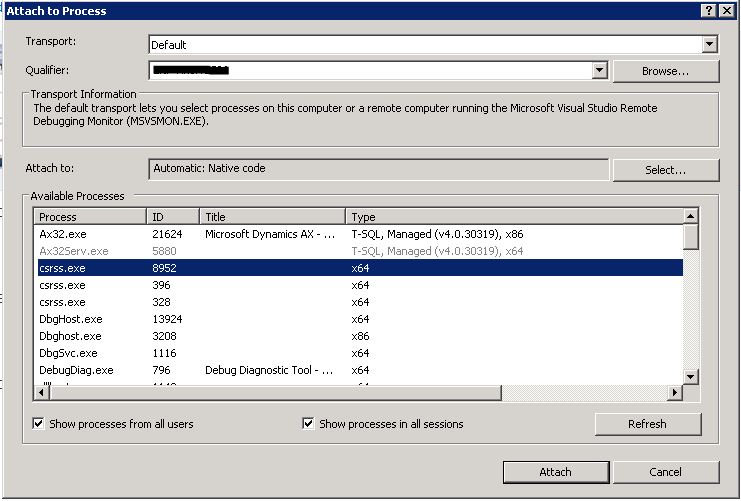
Last week I needed to debug a batch job. In AX2012 all the batch jobs run in IL. To debug these jobs you need to use Visual Studio and attach the AOS process. When I tried to attach Ax32Serve.exe, the process was disabled in the window as show below

Attach to process window
This made me wonder what is stopping the process from being available to attach. After a little investigation I realized that we are using Debug Diagnostic tool to create the dumps in case the AOS crashes and one of the crash rules to monitor the AOS was active. After de-activating the rule the AOS process was available to be attached for debugging purpose. So apparently only one application can monitor a running process.


This posting is provided "AS IS" with no warranties. Use code at your own risk.

Wednesday, 13 June 2012

Wrong EDT on HcmEmployment

In Dynamics AX 2012, financial dimensions has been given a full makeover. As a results the tables which had fields with EDT Dimension has to be replaced with fields that have the new EDT DimensionDefaut. This can be observed by looking at fields like CustTable.DefaultDimension. However HcmEmployment.DefaultDimension refers to EDT RefRecId as shown below.


Although it works fine as DimensionDefault is derived from RefRecId, but if you try to use some of the classes like DimensionProvider, system will throw following error 

Unknown type: RefRecId

The method addDataSourceToQuery in the DimensionProvider class checks the field's EDT and throws error if it is not a proper EDT. This field in the HcmEmployment table needs to be changed to the right EDT  until a hotfix addresses the issue.


This posting is provided "AS IS" with no warranties. Use code at your own risk.

Monday, 18 December 2006

Attaching new database to AOS in Dynamicx AX 4 SP1

We are in the process of upgrading our Dynamics AX application from 3.0 to 4.o. After the upgradation of Application, last week we started the database upgradation in Dev environment. We are using SQL 2000 as our DB for the 3.0 application and we have decided to upgrade to SQL 2005 along with this Dynamics application. So after ruinning the upgrade script in Dynamics AX 3.0 we created a db in SQL 2005 and ran the DB migration application. This went well and when we startetd the AOS after this process, it failed to start and gave following error.

"Object Server 01: Internal Error occurred executing stored procedure when creating session for the AOS. "

After a little investigation we found out that there are two stored procedures(createserversessions, createusersessions) missing from the database that we have created. These are not missing when we use Dynamics AX setup to create the database. So if you are not using the setup to do everthing for you, you have to be prepared to do some stuff yourself. I'm adding some steps here that I went through when I tried to do stuff myself.

In Dynamics AX 4.0 SP1 installation setup, you are asked to enter the account under which want to run the AOS service(not present in Dynamics AX 4.0 installer, so you have to change the account in services to run it properly otherwise you'll receive an error that can be viewed in event viewer).

Once you choose that account in the installer, the installer adds this account in the DB Logins and gives it following access to you DB.

- db_datareader
- db_datawriter
- db_ddladmin
- public

if you change your database after the AOS is installed you have to give the user under which AOS is running the above mentioned rights to your database, and create the procedures (createserversessions, createusersessions). These procedures can be copied from the database that was created by the installer. After you create these procedures give the user, under which AOS is running, Execute permission on these procedures and the AOS should start without any error.


This posting is provided "AS IS" with no warranties. Use code at your own risk.

Wednesday, 13 December 2006

How to prevent user from using Hide/Setup features in Right-Click Menu on a form

Last week while we were fine tuning user right in Dynamics AX 3.0 ( a long overdue work), I came across a intresting scenario at a very crucial time. One of the user called me and told me that she dont have access to a specific field. I thought that maybe I forgot to give access to that user group. When I checked the group permissions the access was there. So I coudnt find out why the user dont have access to that field. I was seriously confused. As a last resort to the problem I gave the user Administrator right(a dangerous thing, if user is careless) and still that field was disabled. Then I asked user to get out of her seat and let me see the system in more detail and then I found out that the field she meant was actually hidden by her and thanks to IntelliMorph, the position of that field was taken up by another field (which was read-only). So showing that field solved the problem. This was really frustrating, so we decided to remove Hide and Setup from right click on any from(althought its very silly to think like this, as this is the beauty of IntelliMorph that users can customise interface the way they want to see it, but sometimes we do need to disable it especially when user themselves dont learn how to solve such small issues).

As I started to find out how to remove Hide and Setup from right click. I came to know that these are somewhere in base classes that are not accessable in Axapta. Setup however can be controlled by assigning Security Keys to "SysSetupForm" and then using the security framework to restrict access to this setup form. But I can't find any way to do the same with the Hide functionality. With a little more research I came accross "SysSetupFormRun" class. This class has a very intresting method called "task". Here we can tap into the task that are available from the right-click in a form and do whatever we like with it.

After looking at the task method in SysSetupFormRun, I found out that there is a "Task" macro that hold all the enum for different tasks. So I modified these two piece of code and was able to stop users from using Hide and Setup. Following is the code that I modified.

In AOT->Macros->Task add the following code
 
#define.taskFilterSetup(2847)

#define.taskFilterHide(2848)

In AOT->Classes->SysSetupFormRun->task add the following code

 public int task(int _p1)  
 {  
   #task  
   FormDataSource formDataSource;  
   
   int ret;  
   
   if (_p1 == #taskFilter)  
   {  
     formDataSource = this.objectSet();  
     if (formDataSource &&  
       formDataSource.queryRun() &&  
       formDataSource.queryRun().args() &&  
       !formDataSource.queryRun().args().caller())  
     {  
       formDataSource.queryRun().args().caller(this);  
     }  
   }  
   
   // code change begin  
   if (_p1 == #taskFilterHide or _p1 == #taskFilterSetup)  
   {  
     return 0;  
   }  
   // code change end  
   
   ret = super(_p1);  
   
   return ret;  
 }  

This will still show Hide and Setup tasks in right-click menu on a form but nothing will happen as the user clicks on it(not the proper way but it solves the problem).

Note: This will disable these tasks for all users, you can code it to be available for a user group and not available for others.

This posting is provided "AS IS" with no warranties. Use code at your own risk.

Monday, 16 October 2006

Export properties of all tables to Excel

Here is a small script to export some properties of all tables to an Excel file. Excel code take from Palle Agermark's WebLog Is there anything Excel isn't a good tool for?

 static void TablePropertiesToExcel(Args _args)  
 {  
   Dictionary dictionary = new Dictionary();  
   DictTable  dictTable;  
   int     rowCounter = 1;  
   
   SysExcelApplication excelApp = SysExcelApplication::construct();  
   SysExcelWorkBooks excelWorkBooks;  
   SysExcelWorkBook excelWorkBook;  
   SysExcelWorkSheets excelWorkSheets;  
   SysExcelWorkSheet excelWorkSheet;  
   SysExcelCells excelCells;  
   SysExcelCell excelCell;  
   COM excelRange;  
   COM excelFont;  
     
   SysOperationProgress progress = new SysOperationProgress();  
   
   #define.ColumnName(1)  
   #define.ColumnLabel(2)  
   #define.ColumnSecurityKey(3)  
   ;  
   
   progress.setCaption('Exporting to Excel');  
     
   excelWorkBooks = excelApp.workbooks();  
   excelWorkBook = excelWorkBooks.add();  
     
   excelWorkSheets = excelWorkBook.worksheets();  
   excelWorkSheet = excelWorkSheets.itemFromNum(1);  
   
   excelCells = excelWorkSheet.cells();  
   excelCells.item(1, #ColumnName).value("@SYS16033");  
   excelCells.item(1, #ColumnLabel).value("@SYS25058");  
   excelCells.item(1, #ColumnSecurityKey).value("@SYS73164");  
   
   dictTable = dictionary.tableObject(dictionary.tableNext(0));  
   
   progress.setTotal(dictionary.tableCnt());  
   
   while (dictTable)  
   {  
     rowCounter++;  
   
     progress.setCount(rowCounter-1);  
     progress.setText(dictTable.name());  
   
     excelCell = excelCells.item(rowCounter, #ColumnName);  
     excelCell.value(dictTable.name());  
   
     excelCell = excelCells.item(rowCounter, #ColumnLabel);  
     excelCell.value(dictTable.label());  
   
     excelCell = excelCells.item(rowCounter, #ColumnSecurityKey);  
     excelCell.value(securityKeyId2Name(dictTable.securityKeyId()));  
   
     dictTable = dictionary.tableObject(dictionary.tableNext(dictTable.id()));  
   }  
   
   
   excelRange = excelWorkSheet.range('A1:C1').comObject();  
   excelFont = excelRange.font();  
   excelFont.bold(true);  
   
   excelWorkSheet.columns().item(#ColumnName).autoFit();  
   excelWorkSheet.columns().item(#ColumnLabel).autoFit();  
   excelWorkSheet.columns().item(#ColumnSecurityKey).autoFit();  
   
   excelWorkSheet.name('Tables');  
   excelApp.visible(true);  
 }  
   

This posting is provided "AS IS" with no warranties. Use code at your own risk.